Showing posts with label Devices. Show all posts

Monday, February 20, 2012

Print Your Pictures Instantly Using The Polaroid Instant 3X4 Mobile Printer


Polaroid Instant 3X4 Mobile Printer provides the solution of instant printing from your mobile phone or digital camera. This portable printer can print off 3” x 4” images in a matter of seconds, and it compatible with mostly mobile devices.

It allows printing via Bluetooth or USB cable in no time. The best feature of this gadget is automatic image quality optimization with water-resistant, other features are: tear-proof, smudge-proof and peel-off prints.

Polaroid Instant 3X4 Mobile Printer uses a special paper, this paper already has the colors imbedded in them, and so there is no worry of ink shortage unlike the common printers. The color activation by the printer is done via heat using ZINK technology. The cost of this 2-pounds printer is $170.

Tuesday, February 14, 2012

Get A Fluffy Pillow Remote Control


Many Times, it happens that you missed your TV favorite program because of your lost remote control. However it will not happen again when you have Pillow Remote Control with you. This remote not only provide you a great control of your TV but also allow you to get relaxed for sometime by heading down on it.

You can get this soft and fluffy remote control only for $40. You can use it for relaxation purpose on sofa however when you want to use it for normal functional then first tap "active" button and then start using it for setting the volume or flipping the channels.

Source: BrookStone

Electronic Tattoos For Monitoring Brain And Muscle Activity


John A. Rogers , who is a professor of materials science at the University of Illinois at Urbana-Champaign, has developed a flexible electronic device known as electronic tattoo that make it feasible for the doctors to monitor the heart, brain, and muscle activity of the patient. This new ultra-thin electronics resembled to a tattoo which can stick to skin for sometime and during this time doctor can diagnose and monitor the health condition of the patient.

Actually, Rogers was trying to make a flexible device that can replicate the bulky electrocardiograms and some other monitoring machines and for this purpose he did some research. He made a device that is composed of incredibly thin silicon which can be deformed without breaking.
This electronic tattoo has electrodes which help the doctors in measuring the electric signals produced by muscles and brain. This tattoo doesn’t cause any irritation so a person can wear it for long time. It also has built in LED for visual feedback. According to Rogers, this device has a potential to work as human-computer interface

Source: TechnologyReview

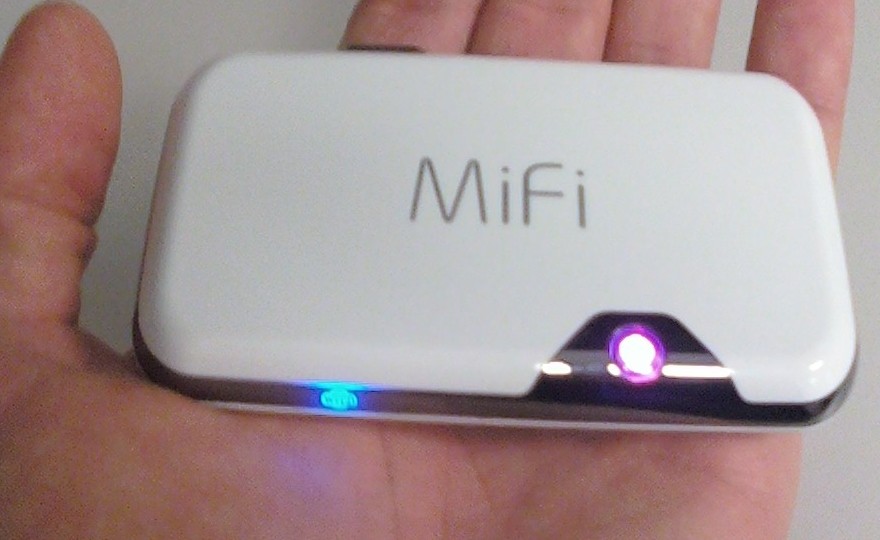
MiFi


 File:MiFi2372.jpg

MiFi is a line of compact wireless routers produced by Novatel Wireless that act as mobile Wi-Fi hotspots. MiFi stands for 'My Wi-Fi'. The MiFi can be connected to a mobile phone (cellular) carrier and provide internet access for up to 5 devices. The MiFi works at a distance up to 10 m (30 ft) and will provide internet or network access to any WiFi enabled peripheral device.

The first MiFi device was introduced in the U.S. in May 2009 by Novatel Wireless, and Novatel owns a registered trademark on the "MiFi" brand name in the U.S. The Novatel MiFi is also marketed as such in the Netherlands, Egypt, Spain, Portugal, Germany, Poland, Romania, Hungary, Slovenia, Qatar, Kuwait, Bahrain, New Zealand, Singapore, Thailand, Japan, South Africa, Puerto Rico, Canada, and Mexico. However, in the United Kingdom, mobile operator 3 owns the "MiFi" trademark and markets a similar device from Huawei under the name.

MiFi (and MiFi-like) devices

Novatel MiFi 2200

  • Limited to 5 Wi-Fi clients such as laptops, cameras, gaming devices and multimedia players; with the exception of manually editing the devices config file to allow more clients.
  • May be connected to a computer via a MicroUSB connection, though doing so disables the Wi-Fi networking, converting the device into a traditional single-client modem. (However, CNET has introduced a tweak to charge the device over USB while maintaining its functionality.)
  • Includes GPS unit, which is usable on some networks (Virgin) and not on others (Verizon).
  • Uses 3G data network (CDMA 1xEVDO RevA).

Novatel MiFi 23xx series

Same functionality as 2200, plus:
  • Accepts SD card for in-device shared media storage.
  • Uses 3G data network (MiFi 2352: HSUPA/HSDPA 900/1900/2100 MHz, MiFi 2372: HSUPA/HSDPA 850/1900/2100 MHz; both support GPRS/EDGE 850/900/1800/1900 MHz).

Novatel MiFi 33xx series

Same functionality as 23xx series, plus:
  • Linux-based MiFi OS with widgets:
  • Messages: perform SMS-based messaging actions such as reading, writing, sending and receiving SMS messages
  • Data Usage: track MiFi data usage in home and roaming networks
  • GeoSearch: leverage the GPS functionality of the MiFi to display a map of the local area, search the local area, display the search results on the map
  • Weather: fetch weather data for the current and defined locations
  • MiFi DLNA Server: start, stop and configure the MiFi DLNA server

4G MiFi devices

The Las Vegas Consumer Electronics Show 2011 saw the introduction of two new 4G capable MiFi devices from Novatel:
  • Verizon Wireless featured the 4510L model, which will connect to Verizon's new LTE 4G network, expected to support 5–12 Mbps download and 2–5 Mbit/s upload.
  • Sprint featured the MiFi 4082, a WiMAX version.
Both devices maintain backward compatibility with existing 3G networks. Other features include:
  • MiFiOS with widget support
  • MicroSD card slot
  • GPS receiver
  • 4 hour battery life
  • Front panel status display using E Ink technology. The front panel display shows battery, signal strength and number of connected devices. The difficulty of viewing such information was seen as a major shortcoming of earlier MiFi devices.

Non-Novatel devices

  • Huawei E5830 (Series), E585, E586 with HSPA+ and Chinese market E5805 using CDMA2000 and ET536 using TD-SCDMA.
  • NetComm MyZone 3G24W
  • Option GlobeSurfer III
  • Sierra Wireless Overdrive (Note: 4G capable; available only in U.S. through Sprint)
  • D-Link DIR-457/MyPocket

Review: MiFi 4510L mobile hotspot for Verizon Wireless


We’ve covered a number of mobile hotspots in the past and they are basically all the same. Some of the better ones have displays or microSD card readers, but at the end of the day they don’t tend to vary much from one another. Typically things come down to two factors: carrier and price. It would be great to add speed and battery life to that list, but speed generally relies on carrier/reception and there isn’t much variation in battery life from one device to the next (especially if you are connecting multiple devices as once).

So if 3G mobile hotspots are more or less all the same, then the release of a 4G LTE model is certainly worth noting. After all a 4G phone is nice to have, but a laptop can benefit even more from the connection: it can better take advantage of the speeds and doesn’t have to worry about the battery-devastating properties of current LTE chips.

At $99 (with a 2-year agreement) the MiFi 4510L is in many ways a more attractive product than Verizon’s other 4G mobile broadband offerings. Most of those are USB modems, which means that they can only work with one USB-capable device at a time (the 4510L can work with up to five WiFi-enabled devices at once). And then there is the Samsung SCH-LC11, which has gotten good reviews but has some issues.


On the hardware side the 4510L is a bit thicker than some of the products we’ve seen in the past but it’s still completely pocketable. Thanks to a matte black back, glossy front, and metallic band around the top it’s a bit more attractive than the typical hotspot as well. There is no microSD card reader, but Novatel Wireless made up for that with two very cool hardware features. The first of these is an electronic paper display on the top that shows vital information like signal strength, battery life, and connected devices. The second perk is an external antenna connector, which is useful if you’d like to boost reception and/or use this as a home device. An antenna is not included.

Setup and connecting to the 451oL are both as easy as they are with a typical hotspot. To your computer the hotspot looks just like a router so you can get data from it as soon as it’s on and has a 4G or 3G connection is established. The MiFi uses 802.11 b/g/n so no bottleneck is created locally.

Speeds are, as with other Verizon LTE devices, excellent. Here are some samples from tests in downtown Manhattan…


Other tests taken in Manhattan were basically in line with these speeds, which is to say they were also quite good. There is a lot of variation based on reception so download speeds can vary from around 7Mbps to up to the 15Mbps seen above. So the speeds are great, well within the range of being used a full-time home connection if the data caps weren’t so severe and the overage pricing insanely high.


There is no question that the 4510L gets the job done. It’s a good device and it’s reasonably priced at $99… but it’s not the only 4G LTE mobile hotspot on Verizon. The Samsung SCH-LC11 is the same price, has a slimmer design, and (from what we hear) has a longer battery life than the 4510L. Because the the Mifi doesn’t use MiFi OS and it doesn’t even have GPS working the normal advantages of going with a Novatel product aren’t present, which makes Samsung’s upstart product a viable option. The MiFi also has the annoying quirk of not being able to transmit a signal while charging over USB, though this isn’t an issue when charging from an outlet.

Overall, if you are looking for a 4G mobile hotspot right now, this is the one to get. The Samsung SCH-LC11 has some advantages over it, but the consensus is that the MiFi is the way to go thanks to better features (like the electronic paper display). Plus, the people that tested them head-to-head found the MiFi to be more reliable. I had an excellent experience with this (aside from Verizon’s LTE outage) and my only hesitation would be its combination of excellent download speeds and Verizon’s bandwidth caps, but if you are careful with these you’ll be fine.

Source: www.geek.com

Thursday, August 25, 2011

3G Data Card Services – BSNL Vs Tata Vs Airtel Vs Reliance

GadgTechWorld.blogspot.com
 http://images02.olx.in/ui/7/50/35/1286543781_127124535_1-3G-WIRELESS-BROADBAND-USB-DATA-CARD-3G-ROUTER-WORK-WITH-ANY-TELECOM-NETWORK-ANY-PLACE-Entire-Tamil-Nadu.jpg
Tata indicom photon 3G and Reliance Netconnect 3G, Airtel 3G and BSNL 3G are already available but which one is best to choose? Advertising campaign of various Internet service providers create confusion among customers to select a service. Hence the 3G internet was always most awaited in India because it just does not mean higher speed but also means revolution following which all around the world there would be more business transactions and more networking. 


http://gadgetsworld.co.in/wp-content/uploads/2010/12/Data-Cards-Comparison.png


Reliance Netconnect Plus
 http://www.pricereviews.co.in/wp-content/uploads/2011/03/Reliance-3G-datacard-price.jpg
 Reliance Communications, India’s second-biggest mobile operator, launched its 3G services in India. The company said it would cover all its 13 zones by the end of March next year. RCom said that it was targeting a national footprint of 3G services through associations with other “like minded, quality 3G licensees” in the remaining nine telecoms zones during the course of next year. The company has launched 3G services in Delhi, Mumbai, Kolkatta and Chandigarh.
Here we bring you the latest 3G plans and pricing from Reliance.


Tata Docomo 3G
 http://media04-ak.vivastreet.com/classifieds/91/9/36499055/large/1.jpg?dt=15098c161afc0fc8774912c14832e21d
Tata DoCoMo became the first private telecom firm to launch 3G mobile services in the country. Tata Teleservices, which has Japanese firm DoCoMo as partner launched 3G mobile services in nine circles, of Kerala, Karnataka, Madhya Pradesh (including Chhattisgarh), Rajasthan, Gujarat, UP (West), Punjab, Haryana and Maharashtra in the auction held recently enabling subscribers to access high speed Internet and video telephony.

Tata Docomo in India has actually started off with an initial free internet offer limited to the first 7days. Following this the plans available start at Rs 750 per month for the 3.6Mbps Plan along with which you get upto Rs 1250 worth of voice calls. This looks a good option but for users who get this new SIM for the sake of high speed internet these free voice or video calls is useless. The main reason behind this is that normally the voice calls are already under Per Second Billing which means that you obviously are already getting calls for cheap hence there is no point paying high for the sake of huge free calls package.

BSNL3G Card

http://www.priceindia.org/broadband/wp-content/uploads/2011/07/bsnl-3g-data-card-postpaid.png

BSNL is committed to taking India into the next league of telecom supremacy by providing technologically advanced 3G Mobile services provider Bharat Sanchar Nigam Ltd (BSNL) has crossed the landmark of 20 Lakh 3G Mobile and Data subscribers in India. It has been able to launch 3G network on Pan India basis except Delhi and Mumbai (MTNL service area).

BSNL has provided various advanced services like High Speed Wireless 3G Broadband, Video Calling, Mobile TV, Music, Video Download etc. At present BSNL had 3G coverage in 675 cities and will expand 3G services to 120 more cities across India by January 2011.

Creating a paradigm shift in the digital communications, BSNL recently launched affordable unlimited 3G Plan just at Rs. 700 in India. By making 3G services affordable with lowest Voice call and Video call charges as well as High Speed 3G Wireless Broadband Data HSDPA connectivity at 1 paisa for 10KB in India.
The cost of this BSNL Micro SIM Kit will be Rs. 100 (Rs. 30 for the Micro sim and Rs. 70 for the 3G FRC Starter Plan).The BSNL Micro SIM card and 3G tariff plans for Apple Devices will be available from BSNL CSC in 3G Services area only.

Airtel 3G
  http://www.newtechnology.co.in/wp-content/uploads/2010/07/Airtel-3g-Data-Card.jpg
Airtel had launched its 3G mobile services successfully bid for 13 zones including key cities like Delhi, Mumbai, Bangalore, Chennai and Hyderabad on a test basis. These cities account for 21 per cent of data traffic in the country. They are also most likely to have early adopters who are eagerly waiting to get their hand(set)s on 3G. Incidentally, the 13 circles also account for 68% of the telco’s revenue market share.

Airtel‘s 3G services, will usher in a new era of unique life style products. The offerings will be specifically targeted towards mobile broadband, given the enhanced speed and user experience which the 3G technology enables. The partners will play a catalyst role in enhancing the customer experience and the data usage habits in the country. In addition to being HSPA+ (High Speed Packet Access) ready from launch, the 3G network will support world class user data speeds and enhanced mobile broadband user experience. High Speed Packet Access plus enables high peak user throughput which are multiple times higher than those supported in current 2G networks.

 https://blogger.googleusercontent.com/img/b/R29vZ2xl/AVvXsEi3un24R-2SWVegWUIPbQ6vm2TV_vKef9lF1HjgoA9d2txcaTZrtoFGEIhGdKjEcQk_FLddkoeVX_T3Rlpkzzg9pOYDdSChmIOx-7Ss0sajNmvTvaG5Zu4LS7_X_QiJXeYwNHBGOj5LCRY/s1600/3G-6210n_application.jpg

Tuesday, August 23, 2011

Latest Invention: Fuel Cell Charger that Runs on Methanol

GadgTechWorld.blogspot.com

Recently Toshiba presented its limited amount of 3,000 units of methanol fuel cell charger. The company called its new invention Dynario. The device makes use of a single 14ml refill of methanol that can initiate the process of recharging device in just 20 seconds.
 

It would be interesting to note that one shot of methanol is enough to fully charge two mobile phones.

Toshiba's new invention runs on a fusion of methanol and atmospheric oxygen. The electricity is generated as a result of a chemical reaction between the two. Currently the 3,000 units of the methanol fuel cell charger are available only at Shop1048 in Japan. One unit can be acquired for around $330. One replacement methanol fuel pack costs around $6, informs EnviroGadget.

At the moment the company is very cautions with launching the device in other countries. However, its test run is expected to become successful.

Dell Launched IPS Touch Monitor

GadgTechWorld.blogspot.com

 
technologies

The long wait has finally come to an end. The device with the future technology is finally coming to its lovers. Dell’s magnificent 21.5 inch multitouch ST2220T monitor equipped with an IPS panel is finally coming to e retailers. Better late than never does seem true in this occasion.

The display is 1920 x 1080 resolutions available at Dell and LogicBuy.  The device is available in $ 310 with a discount of $ 20 plus free shipping only if you purchase it form LogicBuy. Just imagine yourself of using this spectacular device and you will quickly configure how to get the amount.

The spice of the monitor is not its touch screen but it’s the monitor’s A-frame stand with enables it to tilt the screen forward, backward and even flat.  Combine all the things and you will be getting an infrared enabled wide screen touch monitor you ever dreamed of.


Brief Description


Dell ST2220T Multi-Touch 21.5” Monitor


Your life at full tilt

The new DellTM  ST2220T multi-touch monitor will change the way you look at, and interact with life. Featuring an innovative 21.5" multi-touch screen with IPS technology, and multiple tilt angles, you, your friends and family will enjoy a stunning experience in a sleek design.

  • Enhanced touch experience for ultimate interaction

  • Flexible tilt angles allow you to determine the best view for you

  • Vibrant screen display with full HD resolution and a wide viewing angle

Overview
Dell ST2220T Monitor -- Ultimate touch experience


Ultimate touch experience


The touch screen isn’t just for your mobile device anymore. Dell’s new ST2220T multi-touch monitor lets you interact with your PC like never before. With minimal lagging or smudging, you’ll enjoy quick and accurate touch response and full HD resolution. Adjust the 21.5" LCD screen to your comfort level with flexible tilt angles that allow you to position the monitor the way you like it, including the ability to lay it completely flat — great for gaming, watching movies and more.


Dell ST2220T Monitor -- All the right angles

All the right angles


Complement your lifestyle with a monitor that is designed to move with you. For maximum comfort, its A-frame stand design allows flexible tilt adjustment so you can move the screen forward, backward and even flat when the stand is folded. The screen with anti-smudge coating makes your experience more enjoyable, thanks to IPS technology, which provides great color consistency across a wide viewing angle and enhances touch experience by minimizing a pooling effect on the panel. Multiple ports such as VGA, DVI, HDMI and USB, help you connect to your personal electronic devices.


Enhanced sharing experience


The wide 178°/178° (vertical/horizontal) typical viewing angle and built-in speakers can easily transform your monitor into a centerpiece of entertainment. Full HD resolution at 1920x1080 and a high dynamic contrast ratio of 50,000:1 (max) promise a more interactive experience with incredible viewing and multiple modes for a convenient — and superb — performance.


Dell ST2220T Monitor -- Enhanced sharing experience


Dell ST2220T Monitor -- Elegant, sleek and energy efficient

Elegant, sleek and energy efficient

The ST2220T looks sleek and has a high-gloss front bezel that can easily complement your desktop and fit into your home environment. What’s more, it is also energy efficient with a low power consumption that meets ENERGY STAR 5.0 requirements.

Tech Specs

Display

Diagonal Viewable Size:
54.61cm (21.5”)
Panel Type:
IPS (active matrix –TFT LCD)
Maximum Resolution:
1920 x 1080 at 60 Hz
Contrast Ratio:
1000 : 1 (typical), 50,000:1 (dynamic)
Brightness:
250 cd/m2 (typical)
Response Time:
8ms (gray-to-gray) with overdrive
14ms (gray-to-gray) without overdrive
Viewing Angle
178° vertical / 178° horizontal
Color Gamut:
82%2 (CIE1976) / 72% (CIE1931)
Color Depth:
16.7 million colors
Pixel Pitch:
0.248 mm

Connectivity

DVI-D (HDCP)
VGA
HDMI
3 USB 2.0 downstream port
1 USB 2.0 upstream port

Touch Screen

Touch technology:
Optical touch
Touch method:
Finger(s), stylus or any pointer
Stylus diameter:
Minimum 7mm
Touch capabilities:
Mouse functionality (click, drag, double-click and right-click)
Touch functionality (supports Windows® 7 multi-touch gestures)
Touch response time (typical):
15ms
Accuracy:
+/-2.5mm over 95% of touchable area (Microsoft Windows®  7 compliant)  

Stand

Tilt only
VESA Mounting Support:
NO

Electrical

Voltage Required:
100 to 240 VAC/50 or 60 Hz
±3 Hz/1.6A (max.)
Power Consumption (Typical):
28W
USB active 55W (max.)
Power Consumption Stand by / Sleep:
1W

Environmental

Temperature Range Operating:
0° to 40° C (32° to 104° F)
Temperature Range Non-operating:
Storage : -20° to 60° (-4° to 140° F)
Shipping : -20° to 60° (-4° to 140° F)
Humidity Range Operating:
10% to 80% (non-condensing)
Humidity Range Non-operating:
Storage : 5% to 90% (non-condensing)
Shipping : 5% to 90% (non-condensing)
Altitude Operating:
3,657.60 m (12,000ft) max
Altitude Non-operating:
12,191 m (40,000 ft) max

Source: http://accessories.us.dell.com

Wednesday, May 18, 2011

Print images on your CDs with ease


CD and DVD recording is a very useful thing, not always legal of course. We remember the times, when CD recorders were very expensive, trashed blank CDs and recording took a long, long time. Nowadays CD or DVD writers are used by almost everybody- and burning a CD is a common and usual form of data exchange and backup. However, blank CDs are literally blank - they must be marked to know what is recorded on them. Using a CD marker is amateur, no matter how beautiful you write. Solution? Of course there is one gadget that can help you with that.

If you want to beautifully decorate newly written CD or DVD, use printable discs. But what if your printer can’t print on CDs? Then, you’ll probably need this gadget. DiscPainter printer, produced by DYMO, is especially designed for CD and DVD printing.

It is capable to print crisp and vivid images with 600 dpi and 1200 dpi resolution, which takes 1 to 3 minutes to finish. One of the good design moves is transparent window, with help of which you can watch closely how your CD is printed, from beginning to the end. This CD printer is using rotational method of printing, so it is very interesting to watch how your CD gradually becomes a work of art.

This interesting and useful device is sold for 279 dollars. Pretty expensive for a printer that can only print on CDs, while there are many usual printers that can print everything and have this function as well. However... If you like interesting gadgets, or think that every function must be made built into different device, this DiscPainter can be your choice.

Copy CD\DVD on the go without PC


CD and DVD burners are so common nowadays, that it is hard to find a PC without CD-RW\DVD-RW drive. Sometimes, when your friend brings another cool DVD, it is a pity that you cannot just copy it without going to nearest PC. It slows the process, and laziness prevails in most times. Imagine that there is a gadget that will simplify this process. That will be capable of copying CD and DVD without need of PC connection, portable and rapid! Fortunately, such gadget really exists.

EZ Dupe Ultra Slim Single-Target Portable DVD Duplicator is a portable disc-copying machine. Just slide into source DVD and blank one and in minutes you will get one complete copy of source disc. It is slim, so it can fit in your pocket; it is capable of high speeds reading / writing, so you will get a copied disc very quick. The drive is capable of copying DVDs at 8x and CDs at 16x speeds, which is a good achievement for such portable and slim device. It is also multi format, meaning that it will burn both plus and minus DVD discs, in addition to CDs, Multi-session Photo CD, and VCDs; and best of all, this gadget can mark your discs via Lightscribe technology. When copying Audio CDs, you can even change the track order and position them as you like.

This gadget is cool, but what about copyright issues that RIAA is so cared about? In the most cases, copying discs is not completely legal. However, following quote from some old cartoon, "We are not thieves, we are just honest pirates" - this gadget can be very popular at warez parties, if there are some nowadays. Of course, there are many legal ways of using this gadget, which are exactly ones that Portable DVD Duplicator manufacturers thought about. Price is high, about 400-500 dollars, so think twice about usefulness of this kind of device.

Inkless photo printer that can be used in digital cameras


There is one more way to print your favorite pictures now. You can do it using no ink. That means that photo printers will become hand-held and you will be able to carry them around and print pictures whenever you want. No need to get home or to a shop to print out the pictures anymore.

Palaroid Company has invented a new way to print pictures. Now their printers do not use ink to print. These printing gadgets can be built into phones or digital cameras. The product will appear on market in the end of year 2007.

The principle of work is very simple; the paper is changing its color when heat is applied. So applying certain amount of heat will make the piece of paper change color to a specific one. You will not have to have liquid ink cartridges in your printer.

The paper that is used is not usual. It is originally white plastic that has several very thin layers. The layers are micro-thin layers of different colors: yellow on top, then goes magenta and on the very bottom cyan. When heat is applied the paper changes it color thanks to the different color layers.

When the heat is applied to the surface of the paper, the size and shape of the dye molecules changes from crystal to amorphous glasses and allows you to see the layer beneath it, releasing the color. The temperature and exposure on every pixel is controlled and you will be able to make some good pictures right after you have taken the shot. The yellow layer needs the highest temperature and has the shortest melting time. The magenta layer needs lower temperature and some more time to melt, and finally the cyan layer needs lowest temperature and longest exposure time to melt. This is how you can have color pictures at your hands any time you want.

A picture 5 cm x 7.5 cm will take about 30 seconds to print. Good speed for a new technology. However, the picture size is not that big. I think that it would take this new technology very long to replace our standard ways of printing photos. Old-fashion way of making photos is much faster and less expensive.

The printer will cost you about 0 and 100 sheets will cost you $ 20 so you should thing what you would like to buy. It is a pretty big price for something like that. We will se how good the pictures will be.

PCI Express

GadgTechWorld.blogspot.com


PCI Express (Peripheral Component Interconnect Express), officially abbreviated as PCIe, is a computer expansion card standard designed to replace the older PCI, PCI-X, and AGP bus standards. PCIe has numerous improvements over the aforementioned bus standards, including higher maximum system bus throughput, lower I/O pin count and smaller physical footprint, better performance-scaling for bus devices, a more detailed error detection and reporting mechanism, and native hot plugging. More recent revisions of the PCIe standard support hardware I/O virtualization.

The PCIe electrical interface is also used in a variety of other standards, most notably ExpressCard, a laptop expansion card interface.

Format specifications are maintained and developed by the PCI-SIG (PCI Special Interest Group), a group of more than 900 companies that also maintain the Conventional PCI specifications. PCIe 3.0 is the latest standard for expansion cards that is available on mainstream personal computers.
javascript:void(0)

History

While in development, PCIe was initially referred to as HSI (for High Speed Interconnect), and underwent a name change to 3GIO (for 3rd Generation I/O) before finally settling on its PCI-SIG name PCI Express. It was first drawn up by a technical working group named the Arapaho Work Group (AWG) which, for initial drafts, consisted of an Intel only team of architects. Subsequently the AWG was expanded to include industry partners.

PCIe is a technology under constant development and improvement. The current PCI Express implementation is version 3.0.

PCI Express 1.0a

In 2003, PCI-SIG introduced PCIe 1.0a, with a data rate of 250 MB/s and a transfer rate of 2.5 GT/s.

PCI Express 1.1

In 2005, PCI-SIG introduced PCIe 1.1. This updated specification includes clarifications and several improvements, but is fully compatible with PCI Express 1.0a. No changes were made to the data rate.


PCI Express 2.0

PCI-SIG announced the availability of the PCI Express Base 2.0 specification on 15 January 2007.[10] The PCIe 2.0 standard doubles the per-lane throughput from the PCIe 1.0 standard's 250 MB/s to 500 MB/s. This means a 32-lane PCI connector (x32) can support throughput up to 16 GB/s aggregate. The PCIe 2.0 standard uses a base clock frequency of 2.5 GHz, while the first version operates at 1.25 GHz.

PCIe 2.0 motherboard slots are fully backward compatible with PCIe v1.x cards. PCIe 2.0 cards are also generally backward compatible with PCIe 1.x motherboards, using the available bandwidth of PCI Express 1.1. Overall, graphic cards or motherboards designed for v 2.0 will be able to work with the other being
v 1.1 or v 1.0.

The PCI-SIG also said that PCIe 2.0 features improvements to the point-to-point data transfer protocol and its software architecture.

Intel 's first PCIe 2.0 capable chipset was the X38 and boards began to ship from various vendors (Abit, Asus, Gigabyte) as of October 21, 2007.[12] AMD started supporting PCIe 2.0 with its AMD 700 chipset series and nVidia started with the MCP72.[13]All of Intel's prior chipsets, including the Intel P35 chipset, supported PCIe 1.1 or 1.0a.

PCI Express 2.1

PCI Express 2.1 supports a large proportion of the management, support, and troubleshooting systems planned to be fully implemented in PCI Express 3.0. However, the speed is the same as PCI Express 2.0. Most motherboards sold currently come with PCI Express 2.0 connectors.

PCI Express 3.0

PCI Express 3.0 Base specification revision 3.0 was made available in November 2010, after multiple delays. In August 2007, PCI-SIG announced that PCI Express 3.0 would carry a bit rate of 8 gigatransfers per second, and that it would be backwards compatible with existing PCIe implementions. At that time, it was also announced that the final specification for PCI Express 3.0 would be delayed until 2011, although more recent sources stated that it may be available towards the end of 2010. New features for the PCIe 3.0 specification include a number of optimizations for enhanced signaling and data integrity, including transmitter and receiver equalization, PLL improvements, clock data recovery, and channel enhancements for currently supported topologies.

Following a six-month technical analysis of the feasibility of scaling the PCIe interconnect bandwidth, PCI-SIG's analysis found out that 8 gigatransfers per second can be manufactured in mainstream silicon process technology, and can be deployed with existing low-cost materials and infrastructure, while maintaining full compatibility (with negligible impact) to the PCIe protocol stack.

PCIe 2.0 delivers 5 GT/s, but employs an 8b/10b encoding scheme which results in a 20 percent overhead on the raw bit rate. PCIe 3.0 removes the requirement for 8b/10b encoding and instead uses a technique called "scrambling" in which "a known binary polynomial is applied to a data stream in a feedback topology. Because the scrambling polynomial is known, the data can be recovered by running it through a feedback topology using the inverse polynomial"[17] and also uses a 128b/130b encoding scheme, reducing the overhead to approximately 1.5%, as opposed to the 20% overhead of 8b/10b encoding used by PCIe 2.0. PCIe 3.0's 8 GT/s bit rate effectively delivers double PCIe 2.0 bandwidth. According to an official press release by PCI-SIG on 8 August 2007:

"The final PCIe 3.0 specifications, including form factor specification updates, may be available by late 2009, and could be seen in products starting in 2010 and beyond."

As of January 2010, the release of the final specifications had been delayed until Q2 2010. PCI-SIG expects the PCIe 3.0 specifications to undergo rigorous technical vetting and validation before being released to the industry. This process, which was followed in the development of prior generations of the PCIe Base and various form factorspecifications , includes the corroboration of the final electrical parameters with data derived from test silicon and other simulations conducted by multiple members of the PCI-SIG.
On May 31, 2010, it was announced that the 3.0 specification would be coming in 2010, but not until the second half of the year.[20] Then, on June 23, 2010, the PCISpecial Interest Group released a timetable showing the final 3.0 specification due in the fourth quarter of 2010.

Finally, on November 18, 2010, the PCI Special Interest Group officially publishes the finalized PCI Express 3.0 specification to its members to build devices based on this new version of PCI Express.

Current status

PCI Express has replaced AGP as the default interface for graphics cards on new systems. With a few exceptions, all graphics cards being released as of 2009 and 2010 from AMD (ATI) and NVIDIA use PCI Express. NVIDIA uses the high bandwidth data transfer of PCIe for its Scalable Link Interface (SLI) technology, which allows multiple graphics cards of the same chipset and model number to be run in tandem, allowing increased performance. ATI has also developed a multi-GPU system based on PCIe called CrossFire. AMD and NVIDIA have released motherboard chipsets which support up to four PCIe ×16 slots, allowing tri-GPU and quad-GPU card configurations.

Uptake for other forms of PC expansion has been much slower and conventional PCI remains dominant. PCI Express is commonly used for disk array controllers, onboard gigabit Ethernet, and Wi-Fi but except for graphics cards, add-in cards are still generally conventional PCI, particularly at the lower end of the market. Sound cards, TV/capture-cards, modems, serial port/USB/Firewire cards, network/WiFi cards and other cards with low-speed interfaces are still nearly all conventional PCI. For this reason most motherboards supporting PCI Express offer conventional PCI slots as well. As of 2010 many of these cards are starting to make their way over to x8, x4, or x1 PCIe slots which are present in motherboards. For instance, almost all new sound cards from the second half of 2010 are now PCIe.

ExpressCard has been introduced on several mid- to high-range laptops such as Apple's MacBook Pro line. Unlike desktops, however, laptops frequently only have one expansion slot. Replacing the PC card slot with ExpressCard slot means a loss in compatibility with PC-card devices.

Asus - Crosshair IV Formula review


Republic Of Gamers motherboards sit at the top of the Asus product tree, and this was amply demonstrated by the recent IT Reviews coverage of the ROG Rampage III Extreme Core i7 that weighs in at a hefty £330.

It takes a few moments to figure out exactly where the Crosshair IV Formula fits into the ROG family as the model codes and chipsets are constantly evolving. Rampage III motherboards use an Intel X58 chipset to support LGA1366 Core i7, Maximus III uses P55 chipset for LGA1156 Core i5/i7 and Crosshair IV has the latest AMD 890FX + SB850 chipset for Socket AM3 CPUs.

The final part of the model names defines the list of features so a Formula is a regular ATX board with ‘standard' ROG features for overclocking and support for multiple graphics cards. A Gene model is a Micro-ATX design that is aimed at LAN gamers who fancy a portable PC, while Extreme models come with every last feature that the Asus engineers can muster. We understand that Asus has a Crosshair IV Extreme in the works that uses a Lucid chip to add SLI support alongside the CrossFireX support that is provided by the 890FX chipset.

The pricing of the three groups of motherboards follows the pricing of the corresponding CPUs so Rampage III is the most expensive followed by Maximus III, which means that this £170 Crosshair IVFormula is a budget product compared to other ROG motherboards.

Crosshair IV Formula is clearly based on Crosshair III but Asus has added a stack of features to create the new model. At the heart of things we have a change from AMD 790FX + SB750chipset to the new 890FX + SB850 which adds SATA 3.0 native support. This means that the six laid down red SATA connectors have a maximum bandwidth connection of 6Gb/second compared to the 3Gb/second of the black SATA 2.0 connector that is attached to the JMicron chip that also controls the eSATA port on the I/O panel.

Unfortunately the new chipset doesn't support USB 3.0 so Asus has employed an NEC chip to provide two USB 3.0 ports on the I/O panel alongside seven native USB 2.0 ports and mid-board headers for another five USB 2.0 ports.


Asus has increased PCI Express graphics support on Crosshair IV so where you ‘only' got two graphics slots on Crosshair III, the new motherboard has four long slots. They provide two slots with 16 lanes of PCI Express 2.0 or one slot with 16 lanes and two with eight lanes each. The fourth slot delivers four lanes of PCI Express 2.0. We put that ‘only' in inverted commas as the appeal of dual graphics cards seems limited, while the need for triple cards is highly questionable. You also get two PCI slots.

Our sample of Crosshair IV Formula came to us from AMD rather than Asus as it was supplied with the hexa-core AMD Phenom II X6 1090T that we recently reviewed. That covers the question of whether Crosshair IV supports the latest versions of Phenom II, as it does, all the way up to a TDP of 140W. AMD has some new models of Phenom II that are due for release in the near future. Although the CPUs have two, three or four cores they are apparently based on Phenom II X6 silicon.

With previous chipsets AMD allowed motherboards manufacturers to include an option in the BIOS called ACC that could be used to unlock extra CPU cores but this has changed with the 890FXchipset . Manufacturers are no longer allowed to use AMD's ACC feature but instead have to develop their own technology, so Asus has come up with a BIOS option that looks very similar to ACC. Asus has also added a Core Unlocker button at the foot of the motherboard that performs the task instantly, but clearly you can only unlock cores if AMD has disabled them in firmware, rather than by fusing them completely at the fabrication plant. As the saying goes, your mileage may vary.

The Core Unlocker button sits alongside three other buttons. In addition to the usual Power and Reset buttons, Asus has fitted a Turbo Key II button that automatically overclocks your CPU. We used this feature to overclock our Phenom II X6 1090T from 3.2GHz to 3.73GHz with a system power draw of 215W.
Manual overclocking using the BIOS allowed us to get to 3.8GHz quite easily but the power draw shot up to 280W, so we feel that Turbo Key II did a fine job.

Asus - Crosshair IV Formula features - Verdict

Asus charges a steep price for the Crosshair IV Formula but you get masses of hardware features in return. Despite the cost we feel this AMD motherboard offers decent value for money and there is no denying that it looks absolutely gorgeous.

ASRock - X58 Extreme3 review


Over the past 18 months we've seen a long procession of Intel X58 motherboards pass across our test bench. In many respects the ASRock X58 Extreme3 looks quite familiar, as we have seen most of the features before and the layout follows a predictable form. There are six DDR3 memory slots connected to the integrated triple channel memory controller that supports up to 24GB of DDR3-2000 RAM.

Moving down the board there are three graphics slots that support CrossFireX and SLI. The two blue slots each get a full 16 lanes of PCI Express 2.0 while the long white PCI Express slot looks as though it should support a third graphics card but only gets four lanes of slower PCI Express. If you fancy running SLI with a third nVidia card for PhysX then ASRock has the hardware for you. In addition to the graphics slots there are two PCI slots and a PCI Express x1 slot.

The input/output side of things is covered by the Intel ICH10R Southbridge with the addition of a Marvell 9128 controller to deliver eight SATA 2.0 connectors, along with connectors for two IDE drives and one floppy drive. The connectors on the side of the board are laid down for maximum convenience when you plug in the cables.
 
On the I/O panel there are two PS/2 ports, a Clear CMOS button, audio with optical and coaxial S/PDIF, Gigabit LAN, one eSATA port, five USB 2.0 ports and two USB 3.0 ports. Mid-board there are headers for four more USB 2.0 ports and a second Firewire port.

The unusual feature in that list is the pair of USB 3.0 ports that are powered by an NEC UPD720200 controller. We expect to see USB 3.0 and SATA 3.0 move into the mainstream but that will take some time. As things stand the hardware on offer in the ASRock is fairly typical X58 fare with the addition of a sprinkling of USB 3.0 goodness.


That's not to suggest that ASRock has skimped on the goodies. At the foot of the board there are Power and Reset micro buttons and an LED debug display. The quality of the cooling system looks rather imposing with a gunmetal grey finish and there's a hefty cooler on the power regulation hardware with an active 40mm fan to keep the air moving. Generally speaking we don't like small fans as they can be annoyingly noisy, but we had no problems with the cooler on the X58 Extreme3.

The software that is included with the ASRock includes a couple of utilities that didn't really grab our attention. These are ASRock IE to ‘reduce the number of output phases' to save power and ASRock OC DNA so you can ‘record your overclocking record to share with friends'. We were, on the other hand, keen to try the ASRock OC Tuner so we could get busy overclocking.

The layout of the software is fairly conventional for a Taiwanese tech company and looks like the dashboard of a motorcycle with dials and gauges that show what is going on as you change voltage and clock settings. Unfortunately we found it didn't work very well and we were unable to make our 2.8GHz Core i7 930 run reliably at 3.36GHz. Things didn't look good for this Extreme motherboard until we dumped the software and started working in the BIOS.

Here the ‘CPU EZ OC Setting' section gives you the option to load preset profiles. In the case of our Core i7 930 we had six options that started at 3.6GHz (180MHz base clock) and went all the way to 4.2GHz (210MHz) with the click of a keyboard. Despite our apprehension, the maximum setting of 4.2GHz was completely stable and delivered superb results, albeit at the expense of a relatively high power draw. At idle the system, which used an HD 5850 graphics card, drew 150W which rose to 250W under load. Other overclocked Core i7 PCs that we have tested typically draw 20W or 30W less than that with CPU speeds around the 4GHz mark.

ASRock - X58 Extreme3 features - Verdict

We were impressed by the way that the ASRock OC Tuner section of the BIOS delivered top performance with the minimum of work. The result is a motherboard that is fairly packed with features including USB 3.0, although the price is rather steep. Despite that we found plenty to admire in the ASRock X58 Extreme3.

McAfee - Encrypted USB review

GadgTechWorld.blogspot.com

Convenient and easy to use, USB flash memory or 'thumb' drives are an increasingly popular means of storing and transporting data. Lose one, however, and anyone can access the files they contain unless you routinely encrypt or make other arrangements to protect them. McAfee takes care of most of this for you with its family of secure USB storage devices (previously from SafeBoot) offering built-in data access and encryption facilities.

There are several different products to choose from, McAfee sending us three, starting with the Standard drive (from £18 + VAT for 128MB), which uses simple passwords to control access, with each user allotted their own private, AES-encrypted partition.

For those wanting a little bit more, the Encrypted USB Phantom drive (from £100 + VAT for a 1GB device) adds a built-in fingerprint scanner for secure two-factor authentication. Meanwhile the mIDentity implementation (from £141 + VAT for 1GB) uses a smartcard and a PIN code to more securely store user credentials and can also be used for remote VPN authentication.

All of them look much like ordinary USB thumb drives and can be plugged into any PC with a USB 1.1/2.0 interface. Up to 4GB of storage can be made available, although not all either visible or accessible straight away. Depending on how they've been configured a public and/or read-only partition may be available, but other, protected data will be hidden and only accessible by authorised users once their credentials have been verified by the device.

Additional client software is also required, in the form of a Windows-based management utility to, for example, set up new users and their storage partitions, plus a client application to make the data accessible to authenticated users. Standard and Phantom drives share the same utilities which we found very easy to install and use, although the documentation could do with updating.


Separate tools are required to manage and use the mIDentity devices and these were clearly from a different developer, with a completely different interface which we found a lot harder to get to grips with.
In use the Standard drive proved to be the quickest and easiest, requiring no more than a password to open up each protected storage area. Phantom users, however, must first register their fingerprints, the built-in scanner proving to be a little awkward in practice, requiring an extension cable to enable it to be best positioned.

To set up the mIDentity device we had first to fit the smartcard (the same size as a mobile SIM), after which we had to install the software and set up PIN codes and digital certificates. This took a lot longer and was far from intuitive.

Once everything was configured, however, the drives could all be used more or less like any normal flash memory stick, yet with integrated security and encryption which would be difficult to crack should they be lost or stolen. Added to which there are few clues on the outside and little to see if a McAfee Encrypted USB drive is plugged into a standard PC; such that, to the casual observer, protected data is almost invisible.
On the downside, the McAfee Encrypted USB drives are more pricey than equivalent standard devices. But they're not hugely expensive and, depending on how you value your data, that extra cost could well be worth paying.

McAfee - Encrypted USB features - Verdict

Although more expensive than standard USB thumb drives, McAfee Encrypted USB devices offer additional access controls and strong encryption to protect the data they contain in the event of drives being lost or stolen. Varying levels of protection are available including an optional integrated fingerprint scanner and the use of smartcards to securely encrypt user credentials.