Showing posts with label Internet. Show all posts

Tuesday, February 14, 2012

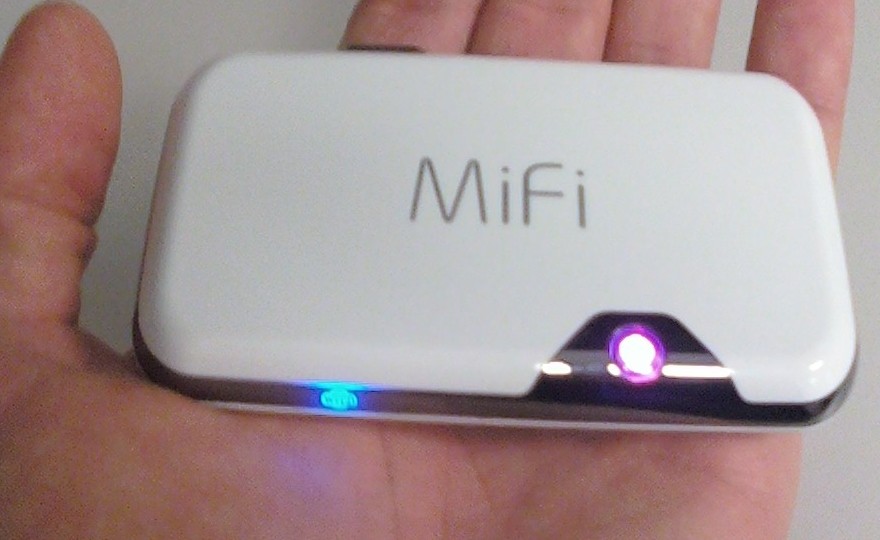
MiFi


 File:MiFi2372.jpg

MiFi is a line of compact wireless routers produced by Novatel Wireless that act as mobile Wi-Fi hotspots. MiFi stands for 'My Wi-Fi'. The MiFi can be connected to a mobile phone (cellular) carrier and provide internet access for up to 5 devices. The MiFi works at a distance up to 10 m (30 ft) and will provide internet or network access to any WiFi enabled peripheral device.

The first MiFi device was introduced in the U.S. in May 2009 by Novatel Wireless, and Novatel owns a registered trademark on the "MiFi" brand name in the U.S. The Novatel MiFi is also marketed as such in the Netherlands, Egypt, Spain, Portugal, Germany, Poland, Romania, Hungary, Slovenia, Qatar, Kuwait, Bahrain, New Zealand, Singapore, Thailand, Japan, South Africa, Puerto Rico, Canada, and Mexico. However, in the United Kingdom, mobile operator 3 owns the "MiFi" trademark and markets a similar device from Huawei under the name.

MiFi (and MiFi-like) devices

Novatel MiFi 2200

  • Limited to 5 Wi-Fi clients such as laptops, cameras, gaming devices and multimedia players; with the exception of manually editing the devices config file to allow more clients.
  • May be connected to a computer via a MicroUSB connection, though doing so disables the Wi-Fi networking, converting the device into a traditional single-client modem. (However, CNET has introduced a tweak to charge the device over USB while maintaining its functionality.)
  • Includes GPS unit, which is usable on some networks (Virgin) and not on others (Verizon).
  • Uses 3G data network (CDMA 1xEVDO RevA).

Novatel MiFi 23xx series

Same functionality as 2200, plus:
  • Accepts SD card for in-device shared media storage.
  • Uses 3G data network (MiFi 2352: HSUPA/HSDPA 900/1900/2100 MHz, MiFi 2372: HSUPA/HSDPA 850/1900/2100 MHz; both support GPRS/EDGE 850/900/1800/1900 MHz).

Novatel MiFi 33xx series

Same functionality as 23xx series, plus:
  • Linux-based MiFi OS with widgets:
  • Messages: perform SMS-based messaging actions such as reading, writing, sending and receiving SMS messages
  • Data Usage: track MiFi data usage in home and roaming networks
  • GeoSearch: leverage the GPS functionality of the MiFi to display a map of the local area, search the local area, display the search results on the map
  • Weather: fetch weather data for the current and defined locations
  • MiFi DLNA Server: start, stop and configure the MiFi DLNA server

4G MiFi devices

The Las Vegas Consumer Electronics Show 2011 saw the introduction of two new 4G capable MiFi devices from Novatel:
  • Verizon Wireless featured the 4510L model, which will connect to Verizon's new LTE 4G network, expected to support 5–12 Mbps download and 2–5 Mbit/s upload.
  • Sprint featured the MiFi 4082, a WiMAX version.
Both devices maintain backward compatibility with existing 3G networks. Other features include:
  • MiFiOS with widget support
  • MicroSD card slot
  • GPS receiver
  • 4 hour battery life
  • Front panel status display using E Ink technology. The front panel display shows battery, signal strength and number of connected devices. The difficulty of viewing such information was seen as a major shortcoming of earlier MiFi devices.

Non-Novatel devices

  • Huawei E5830 (Series), E585, E586 with HSPA+ and Chinese market E5805 using CDMA2000 and ET536 using TD-SCDMA.
  • NetComm MyZone 3G24W
  • Option GlobeSurfer III
  • Sierra Wireless Overdrive (Note: 4G capable; available only in U.S. through Sprint)
  • D-Link DIR-457/MyPocket

Review: MiFi 4510L mobile hotspot for Verizon Wireless


We’ve covered a number of mobile hotspots in the past and they are basically all the same. Some of the better ones have displays or microSD card readers, but at the end of the day they don’t tend to vary much from one another. Typically things come down to two factors: carrier and price. It would be great to add speed and battery life to that list, but speed generally relies on carrier/reception and there isn’t much variation in battery life from one device to the next (especially if you are connecting multiple devices as once).

So if 3G mobile hotspots are more or less all the same, then the release of a 4G LTE model is certainly worth noting. After all a 4G phone is nice to have, but a laptop can benefit even more from the connection: it can better take advantage of the speeds and doesn’t have to worry about the battery-devastating properties of current LTE chips.

At $99 (with a 2-year agreement) the MiFi 4510L is in many ways a more attractive product than Verizon’s other 4G mobile broadband offerings. Most of those are USB modems, which means that they can only work with one USB-capable device at a time (the 4510L can work with up to five WiFi-enabled devices at once). And then there is the Samsung SCH-LC11, which has gotten good reviews but has some issues.


On the hardware side the 4510L is a bit thicker than some of the products we’ve seen in the past but it’s still completely pocketable. Thanks to a matte black back, glossy front, and metallic band around the top it’s a bit more attractive than the typical hotspot as well. There is no microSD card reader, but Novatel Wireless made up for that with two very cool hardware features. The first of these is an electronic paper display on the top that shows vital information like signal strength, battery life, and connected devices. The second perk is an external antenna connector, which is useful if you’d like to boost reception and/or use this as a home device. An antenna is not included.

Setup and connecting to the 451oL are both as easy as they are with a typical hotspot. To your computer the hotspot looks just like a router so you can get data from it as soon as it’s on and has a 4G or 3G connection is established. The MiFi uses 802.11 b/g/n so no bottleneck is created locally.

Speeds are, as with other Verizon LTE devices, excellent. Here are some samples from tests in downtown Manhattan…


Other tests taken in Manhattan were basically in line with these speeds, which is to say they were also quite good. There is a lot of variation based on reception so download speeds can vary from around 7Mbps to up to the 15Mbps seen above. So the speeds are great, well within the range of being used a full-time home connection if the data caps weren’t so severe and the overage pricing insanely high.


There is no question that the 4510L gets the job done. It’s a good device and it’s reasonably priced at $99… but it’s not the only 4G LTE mobile hotspot on Verizon. The Samsung SCH-LC11 is the same price, has a slimmer design, and (from what we hear) has a longer battery life than the 4510L. Because the the Mifi doesn’t use MiFi OS and it doesn’t even have GPS working the normal advantages of going with a Novatel product aren’t present, which makes Samsung’s upstart product a viable option. The MiFi also has the annoying quirk of not being able to transmit a signal while charging over USB, though this isn’t an issue when charging from an outlet.

Overall, if you are looking for a 4G mobile hotspot right now, this is the one to get. The Samsung SCH-LC11 has some advantages over it, but the consensus is that the MiFi is the way to go thanks to better features (like the electronic paper display). Plus, the people that tested them head-to-head found the MiFi to be more reliable. I had an excellent experience with this (aside from Verizon’s LTE outage) and my only hesitation would be its combination of excellent download speeds and Verizon’s bandwidth caps, but if you are careful with these you’ll be fine.

Source: www.geek.com
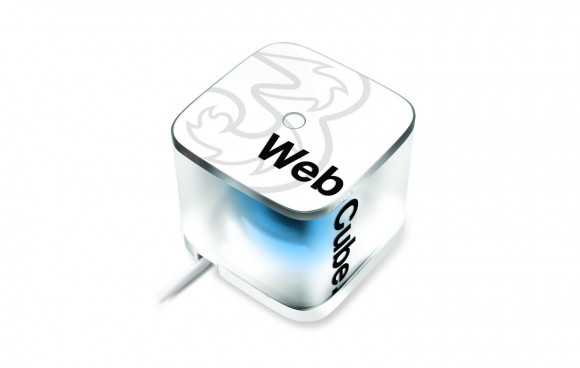
Introducing Broadband in a Box – Three Web Cube


This week we’ve introduced a brand new product to our broadband range. It’s the first time it’s been launched in the UK, and it’s designed for the significant chunk of the population, especially renters and students, that have told us they want Wi-Fi at home, just without the phone line and the lengthy contract.

So we’ve designed Web Cube, and it’s something that we’re really excited about.

The Web Cube’s Wi-Fi signal is powered by our 3G network, so it comes ready-to-go with a mobile broadband SIM card. It’s really easy to set up – just plug it in, turn it on and connect using the name and password supplied in the box. You don’t need a phone line to get going, as long as it’s plugged into the mains and your SIM is inserted, our network will do the rest.

The Web Cube is HSPA+ enabled to the 21.1Mbps technical standard, to deliver typical download speeds of 2-5Mbps, comparable to those of entry-level fixed-line broadband solutions, with the potential to reach a maximum download speed in excess of 10Mbps. Up to five Wi-Fi enabled devices can be connected at any one time, including smartphones, laptops and tablets, and it has a range of up to 30 metres.

Because the Web Cube is brand new to the UK, before we take it nationwide we’ve chosen to launch in a few key cities first. We want to test the market, so we’ve gone to Leeds, Glasgow and Edinburgh, some of our most successful areas for Mobile Broadband, to kick things off.

We hope to be able to roll-out Web Cube nationwide very soon, so if you’re not in Glasgow, Edinburgh or Leeds but you’re still interested, you can register your details online and we’ll be in touch when we have more information.

In the meantime, if you manage to get your hands on one, or if you know someone who has one, we’d love to hear your feedback.

Thursday, August 25, 2011

3G Data Card Services – BSNL Vs Tata Vs Airtel Vs Reliance

GadgTechWorld.blogspot.com
 http://images02.olx.in/ui/7/50/35/1286543781_127124535_1-3G-WIRELESS-BROADBAND-USB-DATA-CARD-3G-ROUTER-WORK-WITH-ANY-TELECOM-NETWORK-ANY-PLACE-Entire-Tamil-Nadu.jpg
Tata indicom photon 3G and Reliance Netconnect 3G, Airtel 3G and BSNL 3G are already available but which one is best to choose? Advertising campaign of various Internet service providers create confusion among customers to select a service. Hence the 3G internet was always most awaited in India because it just does not mean higher speed but also means revolution following which all around the world there would be more business transactions and more networking. 


http://gadgetsworld.co.in/wp-content/uploads/2010/12/Data-Cards-Comparison.png


Reliance Netconnect Plus
 http://www.pricereviews.co.in/wp-content/uploads/2011/03/Reliance-3G-datacard-price.jpg
 Reliance Communications, India’s second-biggest mobile operator, launched its 3G services in India. The company said it would cover all its 13 zones by the end of March next year. RCom said that it was targeting a national footprint of 3G services through associations with other “like minded, quality 3G licensees” in the remaining nine telecoms zones during the course of next year. The company has launched 3G services in Delhi, Mumbai, Kolkatta and Chandigarh.
Here we bring you the latest 3G plans and pricing from Reliance.


Tata Docomo 3G
 http://media04-ak.vivastreet.com/classifieds/91/9/36499055/large/1.jpg?dt=15098c161afc0fc8774912c14832e21d
Tata DoCoMo became the first private telecom firm to launch 3G mobile services in the country. Tata Teleservices, which has Japanese firm DoCoMo as partner launched 3G mobile services in nine circles, of Kerala, Karnataka, Madhya Pradesh (including Chhattisgarh), Rajasthan, Gujarat, UP (West), Punjab, Haryana and Maharashtra in the auction held recently enabling subscribers to access high speed Internet and video telephony.

Tata Docomo in India has actually started off with an initial free internet offer limited to the first 7days. Following this the plans available start at Rs 750 per month for the 3.6Mbps Plan along with which you get upto Rs 1250 worth of voice calls. This looks a good option but for users who get this new SIM for the sake of high speed internet these free voice or video calls is useless. The main reason behind this is that normally the voice calls are already under Per Second Billing which means that you obviously are already getting calls for cheap hence there is no point paying high for the sake of huge free calls package.

BSNL3G Card

http://www.priceindia.org/broadband/wp-content/uploads/2011/07/bsnl-3g-data-card-postpaid.png

BSNL is committed to taking India into the next league of telecom supremacy by providing technologically advanced 3G Mobile services provider Bharat Sanchar Nigam Ltd (BSNL) has crossed the landmark of 20 Lakh 3G Mobile and Data subscribers in India. It has been able to launch 3G network on Pan India basis except Delhi and Mumbai (MTNL service area).

BSNL has provided various advanced services like High Speed Wireless 3G Broadband, Video Calling, Mobile TV, Music, Video Download etc. At present BSNL had 3G coverage in 675 cities and will expand 3G services to 120 more cities across India by January 2011.

Creating a paradigm shift in the digital communications, BSNL recently launched affordable unlimited 3G Plan just at Rs. 700 in India. By making 3G services affordable with lowest Voice call and Video call charges as well as High Speed 3G Wireless Broadband Data HSDPA connectivity at 1 paisa for 10KB in India.
The cost of this BSNL Micro SIM Kit will be Rs. 100 (Rs. 30 for the Micro sim and Rs. 70 for the 3G FRC Starter Plan).The BSNL Micro SIM card and 3G tariff plans for Apple Devices will be available from BSNL CSC in 3G Services area only.

Airtel 3G
  http://www.newtechnology.co.in/wp-content/uploads/2010/07/Airtel-3g-Data-Card.jpg
Airtel had launched its 3G mobile services successfully bid for 13 zones including key cities like Delhi, Mumbai, Bangalore, Chennai and Hyderabad on a test basis. These cities account for 21 per cent of data traffic in the country. They are also most likely to have early adopters who are eagerly waiting to get their hand(set)s on 3G. Incidentally, the 13 circles also account for 68% of the telco’s revenue market share.

Airtel‘s 3G services, will usher in a new era of unique life style products. The offerings will be specifically targeted towards mobile broadband, given the enhanced speed and user experience which the 3G technology enables. The partners will play a catalyst role in enhancing the customer experience and the data usage habits in the country. In addition to being HSPA+ (High Speed Packet Access) ready from launch, the 3G network will support world class user data speeds and enhanced mobile broadband user experience. High Speed Packet Access plus enables high peak user throughput which are multiple times higher than those supported in current 2G networks.

 https://blogger.googleusercontent.com/img/b/R29vZ2xl/AVvXsEi3un24R-2SWVegWUIPbQ6vm2TV_vKef9lF1HjgoA9d2txcaTZrtoFGEIhGdKjEcQk_FLddkoeVX_T3Rlpkzzg9pOYDdSChmIOx-7Ss0sajNmvTvaG5Zu4LS7_X_QiJXeYwNHBGOj5LCRY/s1600/3G-6210n_application.jpg

Monday, August 15, 2011

Hulu!! What is it?


 Are you looking for some inside information on Hulu? Here's an up-to-date report from experts who should know.
Sometimes the most important aspects of a subject are not immediately obvious. Keep reading to get the complete picture.

The stage is set for a showdown between television networks and cable/satellite TV services, thanks to the internet. It won’t happen overnight, but your monthly cable or satellite bill could eventually be replaced by a monthly bill from Hulu, an online service that streams TV shows on demand.

For $10 a month, viewers will reportedly have access to a wider selection of shows than the free, ad-supported version Hulu currently offers. The service would work on PCs and specialized devices such as the iPad, videogame consoles and set-top boxes. The company plans to test a version of this “Hulu Plus” subscription, an expected development, with select users as early as this month to find out whether they’ll will bite, according to sources cited by the Wall Street Journal and All Things Digital.


In order for consumers to pay for a video service like that, it will need to be reasonably comprehensive. So it’s no accident that the same week Hulu’s subscription plans came to light, a Bloomberg report surfaced that the company is talking with CBS, Viacom and Time Warner’s television studio divisions to add their shows. That would be on top of a line-up that already includes “Fox, NBC Universal, ABC, ABC Family, Biography, Lionsgate, Endemol, MGM, MTV Networks, National Geographic, Digital Rights Group, Paramount, PBS, Sony Pictures Television, Warner Bros. and more,” including Wired.com.

For ten bucks, one wouldn’t expect the level of programming cable and satellite offer for larger monthly bills. But if paid Hulu works, the networks will have proof that the internet can circumvent cable and satellite companies and they could easily add more expensive content tiers down the road.

If the networks prove they can charge consumers directly, and consumers are happy to supply their own “cable boxes” in the form of game consoles, television-connected computers, set-top boxes, tablets and so on, it’s difficult to see why networks would tolerate cable and satellite providers grabbing a slice of profits, just for sending the shows through one pipe rather than the other.

Cable and satellite are classic middlemen. When the internet meets the middleman, the middleman tends to disappear — or at least be replaced by a thinner middleman. We’ve seen it with record stores, classified ad-dependent newspapers, video-rental stores, bookstores and any other business that delivers something that the internet can deliver more efficiently.

The “thinner middleman” as far as IPTV is concerned could be ISPs, which already charge more for faster data plans capable of delivering better-looking video. But as multipurpose providers, they’ll never command as large a slice of the pie as cable/satellite companies did with their television-only pipes.

Television networks hold the trump cards, because they own the content that will be distributed — however the market decides to distribute it. Still, cable providers reportedly hope to replace themselves, in a sense, by providing competing services for delivering television over the net. After all, most of them also provide ISP services, and don’t want to lose a source of revenue.

But that ship may have sailed. The networks (with Providence Equity Partners) already own the Hulu internet distribution system, which is accessible from any ISP, and expect it to earn $200 million this year even before the subscription has launched.
Now that the networks are set to start charging for a more comprehensive version of Hulu, cable and satellite companies should be even more nervous about how television shows will be delivered in the coming years than they were already.

Sunday, December 26, 2010

Internet TV:Sony Google TV HDTVs

GadgTechWorld.blogspot.com
Have you ever heard about internet TV? If not than friends let’s have
known. As we all know that Sony is the world’s biggest company and since it has established this Sony company is providing different kind of good quality of products to the people such as camera, phones, TV etc. So similarly  this company has now introduced the new gadget to the people; yes this is Internet TV: Sony Google TV HDTVs.  Much awaited TV of Sony has officially introduced named as Google TV and this lunch includes the four different HDTVs with the inches of 24 incher, 32 incher, 40 incher and 46 incher  & the price of these TVs starts from only $599 to $1399. This HDTVs has come with the white set top  box and is built in Blu-ray player costing $399. This is one of the newly introduced TV in which you can enjoy an experience of a lifetime.
http://sumanl.com.np/wp-content/uploads/2010/10/Sony-Internet-TV.jpg
According to the Mike Abary the senior vice president of the Sony’s Home Division “ Sony Internet TV is world’s first HDTV which combines big screen impact of the Television & full Internet search to the deliver an unrivaled entertainment experience.” “In this TV you can easily search your favorite Television programmes and the websites on same screen at the same time” he added too.

The senior vice president corporative executive and president of Home Entertainment Business Group Bob Ishida also added that “we all are very much proud to be pioneers of the new entertainment category by delivering world’s first Internet TV experience. The Sony Internet TV has created the value by introducing the latest new & compelling ways for enjoying the variety of the content.
The best features of this HDTV is this is built in WiFi with the newly added custom applications which is known as Sony Oriocity and the VOD player come pre installed with the features such as Netflix, Napster, CNBC, Pandora and many more and this Sony HDTVs will  be available by October 24.

Sunday, November 7, 2010

Free Proxy Servers - Anonymous Web Surfing - Unblock Websites

http://maspireinfosystems.com/images/free-web-proxy-server.png

Learn About Free Proxy Servers, How to Unblock Websites, Surf Anonymously


Perhaps you are blocked from visiting MySpace or Facebook at work. Maybe you just want to make sure that you won't be a victim of identity theft. Or you might want to check out your bank balance at an Internet cafe - and don't want anyone to know your account or your password.

Whatever your reason - unblocking websites, protecting your identity, or surfing anonymously, free proxy servers can accomplish all of these tasks for you.

Learn where to find free proxy sites, how to use them, and their benefits here at our page dedicated to free proxy servers.
 
A lot of people are scared and concerned about their anonymity online. With many cyber criminals just waiting to steal your identity - including your personal details such as credit card numbers, one has to be a little more careful when surfing on the Internet.

It is even more crucial when you are using a public computer to view personal information. For example, if you were to go to an Internet cafe checking your bank account information, the next person to use the computer could potentially access your banking information.

But, if you use a proxy server, none of your sensitve information is stored on the computer that you are sitting at, ensuring that all your sensitive and personal information remains safe and secure.

Why Use A Free Proxy Server? 

Free proxy servers protect your identity online

“Protect yourself from identity theft with a free proxy website when using public computers”

The Truth About Public Computers 

Ask yourself this: is there any privacy in public?

Alright, let me shatter some myths for you.

Most Internet cafés claim that they are safe places for you to surf the Internet. The one thing that they don't do is tell you how to protect your sensitive information.

The biggest problem is that computers store cookies which have information about the sites you visit and these sites may save a cookie when you enter the password.

This can translate into a problem if you forget to delete the cookies and history when you logoff the public computer that you are using. If you do forget, there is the possibility that the next user could access that information and use it to gain access to the sites you visited while at the public computer.

So are public computers private and safe?

Neither.

Unless you know the precautions you need to take to erase your tracks (or use a free proxy server), don't visit any sites that you have to login to access them (think e-mail and membership sites) and don't visit any of your banking sites while on a public computer.

Try These Free Proxy Websites 

Safe, Secure, Anonymous Proxy Servers

Do you worry about your anonymity online? Or are you blocked from your favorite website at work or school? Try some of these proxy websites.
Free Proxy Server
This free proxy server has one cool design. This is a web proxy that allows you to unblock MySpace, unblock Facebook, and more.
Bypass School Filter
Designed primarily to be used at school you can use Bypass School Filter to visit MySpace, Facebook, Bebo, Orkut and more.
MySpace Proxy
Perhaps one of the most commmonly blocked websites online is MySpace. Unblock MySpace with this fast and beautifully desined site.
Orkut Proxy
Orkut is another social networking site that is typically blocked at work. Enjoy the speed and privacy provided by our Orkut inspired web proxy.
Free Proxy Website
Brand new free proxy website that will allow you to visit My Space, Facebook, Orkut, and all of the other favorite websites that you love.

Have you used free proxy servers? 

Share your experiences with anonymous web surfing.

I know that a lot of you have never heard of free proxy servers before - but a lot of you have. Share your experiences (good and bad) with free proxy servers, anonymous surfing, and identity theft.

Tuesday, November 2, 2010

WiMAX- A NEW REVOLUTION IN WIRELESS INTERNET

http://areacellphone.com/wp-content/uploads/2010/05/wimax.jpg

GadgTechWorld.blogspot.com

WiMAX is the latest technology in the field of wireless internet. In fact it is the only available technology which enables broadband in wireless internet. WiMAX is the acronym for worldwide interoperability for microwave access. To phrase in simple words, WiMAX enables the users to access high speed internet with extreme mobility. This technology has several benefits when compared with existing WiFi technology. WiMAX uses microwave as a medium for data transfer which means a tower similar to the cell phone tower is used. Due to the use of microwaves, for a range of thirty miles, the data transfer rate can be nearly 75 MBPS. This would enable high speed internet access to more than 1000 computers from a single tower. The major advantages of WiMAX are, rural areas will be able to access broadband internet very easily at a much cheaper rate, Setting up internet access for the whole city can be completed within a couple of days. This would mean that in the near future we would be able to access the internet as if we are using the cell phones. It is possible to get hooked to the net from almost anyplace in the world.

Network scale
The smallest-scale network possible is a personal area network (PAN). A PAN allows devices to communicate with each other over short distances. Bluetooth is the best example of a PAN. A local area network (LAN) can also be easily setup. A LAN allows devices to share information, but is limited to a fairly small central area, such as a company's headquarters, a coffee shop or your house. Many LANs use WiFi to connect the network wirelessly. 

WiMAX is the wireless solution for the next step up in scale, the metropolitan area network (MAN). A MAN allows large areas to be connected, i.e. the size of a city can be connected very easily.
http://hzh3.com/wp-content/uploads/2009/06/060809_wimax.gif

GET READY TO ENJOY HI-SPEED WIRELESS BROADBAND CONNECTION AT A MINIMAL COST

Tuesday, October 19, 2010

Internet Architecture


In this article i written about the internet architecture.

The Internet architecture, which is also sometimes called the TCP/IP architecture after
its two main protocols. The Internet architecture evolved out of experiences with an earlier packet-switched network called the ARPANET. Both the Internet and the ARPANET were funded by the Advanced Research Projects Agency (ARPA), one of the R&D funding agencies of the U.S. Department of Defense. The Internet and ARPANET were around before the OSI architecture, and the experience gained from building them was a major influence on the OSI reference model. While the seven-layer OSI model can, with some imagination, be applied to the Internet, a four-layer model is often used instead. At the lowest level are a wide variety of network protocols, denoted NET1, NET2, and so on. In practice, these protocols are implemented by a combination of hardware (e.g., a network adaptor) and software (e.g., a network device driver). For example, you might find Ethernet or Fiber Distributed Data Interface (FDDI) protocols at this layer. (These protocols in turn may actually involve several sublayers, but the Internet architecture does not presume anything about them.) The second layer consists of a single protocol—the Internet Protocol (IP). This is the protocol that supports the interconnection of multiple networking technologies into a single, logical internetwork. The third layer contains two main protocols—the Transmission Control Protocol (TCP) and the User Datagram Protocol (UDP). TCP and UDP provide alternative logical channels to application programs: TCP provides a reliable byte-stream channel, and UDP provides an unreliable datagram delivery channel (datagram may be thought of as a synonym for message). In the language of the Internet, TCP and UDP are sometimes called end-to-end protocols, although it is equally correct to refer to them as transport protocols.
Running above the transport layer are a range of application protocols, such as FTP, TFTP (Trivial File Transport Protocol), Telnet (remote login), and SMTP (Simple Mail Transfer Protocol, or electronic mail), that enable the interoperation of popular applications. To understand the difference between an application layer protocol and an application, think of all the different World Wide Web browsers that are available (e.g., Mosaic, Netscape, Internet Explorer, Lynx, etc.). There are a similarly large number of different implementations of Web servers. The reason that you can use any one of these application programs to access a particular site on the Web is because they all conform to the same application layer protocol: HTTP (HyperText Transport Protocol). Confusingly, the same word sometimes applies to both an application and the application layer protocol that it uses (e.g., FTP). The Internet architecture has three features that are worth highlighting.

First, as the Internet architecture does not imply strict layering. The application is free to bypass the defined transport layers and to directly use IP or one of the underlying networks. In fact, programmers are free to define new channel abstractions or applications that run on top of any of the existing protocols.

Second, if you look closely at the protocol graph you will notice an hourglass shape—wide at the top, narrow in the middle, and wide at the bottom. This shape actually reflects the central philosophy of the architecture. That is, IP serves as the focal point for the architecture—it defines a common method for exchanging packets among a wide collection of networks. Above IP can be arbitrarily many transport protocols, each offering a different channel abstraction to application programs.

Thus, the issue of delivering messages from host to host is completely separated from the issue of providing a useful process-to-process communication service. Below IP, the architecture allows for arbitrarily many different network technologies, ranging from Ethernet to FDDI to ATM to single point-to-point links.

A final attribute of the Internet architecture (or more accurately, of the IETF culture) is that in order for someone to propose a new protocol to be included in the architecture, they must produce both a protocol specification and at least one (and preferably two) representative implementations of the specification. The existence of working implementations is required for standards to be adopted by the IETF. This cultural assumption of the design community helps to ensure that the architecture’s protocols can be efficiently implemented.

Saturday, October 16, 2010

Information About Web Hosting

Web Hosting

Web hosting is a service through which users can post web pages to the Internet. A web host and hosting service provider (HSP) is a business that provides the services and tools needed for web sites to be viewed on the Web.
Web hosting is a prime service that users can utilize after obtaining either dial-up or broadband access to the Internet. It provides users to broadcast their own information resources to any Internet user that is interested in accessing them. Web hosting makes use of the server/client model to distribute content. A Web hosting provider will provide its client right to access a Web server that will push client's content to recipients on request. Recipients use Web browsers like Microsoft Internet Explorer or Netscape Navigator to request content from the Web over their own Internet connection.

On a special computer Web sites are stored or hosted called as server. The server or host computer permits Internet users connected anywhere to reach site when they put host’s domain address in web browser. The server or host computers are set up so that when someone types Web address in browser, the address will follow a route from computer to computer until it reaches host computer and web site. After that Internet user will be able to browse throughout the Web site. Hosting companies usually need their own domain name in order to host with them.
Web hosts provide the technical resources and equipment that are required to offer a consumer with their own customized Web site. Hosting companies charge a fee for the storing Web site service and allowing Web site visitor traffic flow through computers to get information on site.

Web hosting services are more advantageous because the physical location of the Web server does not reside at the consumer's premises. Many small businesses take advantage of Web hosts in order to free themselves from pre occupying their scarce human and financial resources on Web host issues. Companies and individuals who outsource their Web presence to achieve the following objectives: improve own company focus, reduce operating costs, gain access to in-depth expertise, free internal resources for core competencies and obtain access to world-class capabilities to control IT functions which are difficult to handle. In multiple formats Web hosting is offered to the consumer based upon its requirements. These requirements are depend upon cost and infrastructure provided.

Types of Web Hosting

Web hosting services present in all sizes and shapes. It is useful to break down all services into several "classes" in order to understand the most fundamental differences in pricing and functionality. Each "class" speaks the needs of a particular type of customer.

1) Shared Hosting :
This is the most basic and important of all services. The hosting service providers put several web sites on a single powerful machine.

2) Virtual Dedicated Hosting :
This is a fairly new web hosting service, which seems to be bridge between "shared" and "dedicated" hosting. Several web sites are physically placed on a server, but the number of such sites is small in number and each one is given a dedicated "copy" of the operating system along with portion of computer resources, a copy of web server software in addition to direct "root-level" access to the server itself.

3) Dedicated Hosting:
Dedicated Hosting means that the computer which is used to serve web site is used by users only. Dedicated hosting allocates a Web site to its own server. This is more flexible because it has full control over the back end of the server including choice of OS.

4) Colocated Hosting (Colocation) :
Colocation provides ultimate degree of flexibility. This hosting consist of buying and installing own server on the web hosting provider's premises.

5) Managed hosting :
It is accompanied by a full suite of technical support, maintenance and monitoring services. In managed hosting, customers are provided with their own servers but are still responsible for virtually all administrative and maintenance duties.

Web Hosting Server Technologies :
The different hosting technologies are as follows:

1) Windows Hosting:
Windows hosting means hosting of web services that use Windows operating system. User should choose Windows hosting if he want to use Active Server Pages as server scripting or if he want to use a database like Microsoft Access or Microsoft SQL Server. Windows hosting is also the best choice if user want to develop web site using Microsoft Front Page.

2) Unix Hosting:
UNIX hosting means hosting of web services that uses UNIX operating system.
UNIX was the first reliable and stable web server operating system.

3) Linux Hosting:
Linux hosting means hosting of web services that uses Linux operating system.

4) ASP - Active Server Pages
Microsoft developed Active Server Pages as a server-side scripting technology.
With ASP dynamic web pages can be created by embedding scripting code inside HTML pages. The code is run by the web server before the page is returned to the browser. Both Visual Basic and JavaScript can be used for ASP code.

5) JSP
JSP is a server-side technology developed by Sun. With JSP dynamic web pages can be created by embedding Java code inside HTML pages. The code is run by the web server before the page is returned to the browser. Since JSP uses Java, the technology is not limited to any server-specific platform.

6) FrontPage
Microsoft developed FrontPage as web site design tool. FrontPage provides users easy way to develop a web site without any deep knowledge of web development. Most Windows hosting solutions maintain FrontPage server for users that use FrontPage to develop their web site.

7) PHP
PHP is a server-side scripting language which allows creating dynamic web pages by embedding script code inside HTML pages. The code is run by the web server before the page is returned to the browser.

8) Cold Fusion
Macromedia developed Cold Fusion, which is another server-side scripting language used to develop dynamic web pages.

Some basic terms related to the Internet

Some basic terms related to the Internet

Router: A router connects two or more logical subnets and performs the functions of routing and forwarding information.

Intranet: It is a relatively smaller private network that uses the Internet protocols and connectivity. It is an extension of the Internet and is privately used by organizations.

Extranet: It is a private network that uses Internet technology to share a part of the business information and operations with suppliers and customers. It can be a part of a company’s intranet that provides access to the users outside the company.

Virtual Private Network: It is a private network that allows the exchange of information between computers over a shared or a public network.

Wireless Networking: It refers to computer networking that is carried out over the wireless media.

Broadband Internet: Broadband connectivity to the Internet provides the users with a high-speed Internet access.

Dial-up Internet: In this type of access to the Internet, the user’s computer is attached to a modem connected to a telephone line. Dial-up Internet access involves a modem that dials into an Internet service provider to establish a connection.

Satellite Internet: Internet services that make use of the satellite communication media are termed as satellite Internet services. They are used in locations that are mobile thus making terrestrial Internet connectivity, an impossibility.

Some Funny and Interesting Internet Terms

Some Funny and Interesting Internet Terms

Googling: The Google search engine, being the most popularly used one, has made the word, ‘google’ synonymous to the concept of search engines. Searching the Internet by using the Google search engine is known as googling.

Copypasta: If a text is copy pasted from somewhere and posted in a forum, it is termed as a copypasta. The source is often unknown in such cases. Are you into copypastas?

Egosurfer: The web users who search over the Internet for themselves fall under the class of egosurfers. I am sure most of you play an egosurfer once in a while.

Netiquette: This term is short for net etiquette and refers to the principles of courtesy and consideration for the people using the Internet. It refers to certain basic principles to adhere to while using the Internet. The general ethical principles to be followed in relation to using mailing systems of the Internet are termed as email etiquettes.

Trasher: The users who search over the Internet using all possible means, sometimes even risking the Internet security are known as trashers.

Troll: Trolls are the users who try to become infamous on chat by introducing disturbing links, mimicking other users’ posts and profiles and fighting with others.

Youtuber: A person who is addicted to watching videos on the Internet is referred to as a youtuber.

Want To Download Any Internet Videos

  • Want To Download Any Internet Videos??
  • Like Youtube , Google Videos?
  • Its Simple Process
  • Copy & Paste Address(URL) of online video and download

visit:-
www.keepvid.com